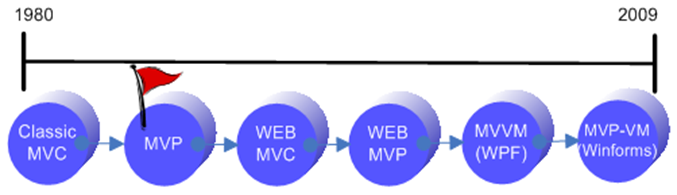
In this post we’ll review the way in which MVP (Model View Presenter) design pattern evolved from Smalltalk’s old fashion 'Classic MVC' and 'Application Model MVC' patterns (see above) and the way in which it has developed and varied during the years that followed. Hopefully, after reviewing the pattern and its variations against its MVC predecessors we'll be able to distinguish MVP from MVC and understand why the MVC vs. MPV discussion makes everyone so confused.
Content
Abstract
MVC Variations
MVC Concept
Classic MVC and 'Application Model' MVC
MVP Twist
MVC vs. MVP
To MVP or not to MVP?
The first MVP was published in 1996 by 'Mike Potel' and declared as IBM's next generation programming model for C++ and Java applications. It was built on the foundations of Smalltalk’s 'Classic MVC' programming model and was intended to better fit the newer operation systems that were introduced at the time and to support client-server applications (read more).
Smalltalk, that two decades before inspired many frameworks and libraries with MVC, was searching for new architecture for its next generation framework called 'Dolphin Smalltalk'. They examine the 'Application Model MVC' pattern which was the latest variation of MVC and find it unfitting to their needs. They kept on searching until they discover IBM's paper describing MVP (mentioned above), they found it very similar to 'Application Model MVC' programming model but with the right twist that made it more fitting to their needs, they stripped it out a little bit and came out with more simplified MVP.
Dolphin Smalltalk's MVP model still fits today's frameworks and is being used as a base architecture for rich-client applications and thin-client applications developed in new frameworks such as .NET Framework (read more).
In 2006 Martin Fowler named Dolphin Smalltalk's MVP Supervising Controller, he took step backward toward 'Application Model MVC' and came out with another variation of MVP called Passive View.
I choose to focus on Dolphin Smalltalk's MVP rather than on IBM's MVP for two reasons:
First, Dolphin's MVP is the mainstream nowadays, IBM's MVP on the other hand contains extra origins such as Interactor, Command, and Selection that we today can live without.
Second, this article attempts to distinguish MVP from MVC by presenting both patterns side by side and explaining the way in which MVP evolved from MVC. The Dolphins presents MVP as an evolution of 'Application Model MVC' where MVP’s Presenter replaces MVC’s 'Application Model'; IBM on the other hand, presents MVP as an evolution of 'Classic MVC' where MVP’s Presenter replaces MVC’s Controller. Indeed, IBM's MVP is the original, but I found Dolphin's way of looking at MVP evolution more appealing and easier to explain, as 'Application Model' is much closer to MVP presenter than the Controller.

Every now and then a new variation of MVP is introduced in order to make it fit to new technologies and new IDE’s. With the introduction of .NET framework I published a post that introduces ways to implement the pattern in both win-forms and web-forms applications. With the spreading of design time binding and the introduction of WPF I published a post that introduced another variation of MVP called MVP-VM, which is a tailor made solution for win-forms applications that empower data binding.
MVC concept is to make a clear division between domain objects (model) and presentation objects (view/controller); it utilizes the Observer-Synchronization mechanism to support multiple presentations (observers) of single domain object (observable) and to keep the domain objects completely unaware of their presentation objects.
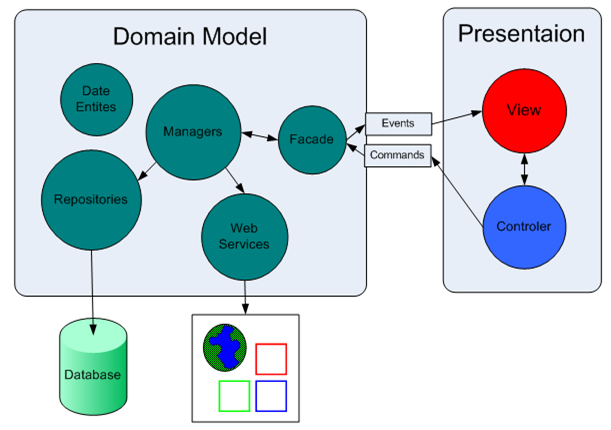
This concept has proven itself over the last three decades, so even though MVP introduces some significant improvements - at the end of the day the concept remain the same.
Before going any further, read about MVP predecessors in "MVC Design Pattern".
In short:
You can see that in both 'Classic MVC' and 'Application Model MVC' - view is a widget on the screen surface and each view has a pair controller which process user inputs (such as mouse click) and command the model as appropriate. 'Application Model MVC' introduces new entity called 'Application Model' that acts as an intermediate class between the model and the views/controllers in order to shield the model from presentation concerns.
Classic MVC

Application Model MVC

What is wrong with 'Application Model MVC'?
The Dolphin's faced the facts that 'Application Model MVC' (all the more 'Classic MVC') is no longer applicable and that it has some usability issues.
It is no longer applicable because there is no need for the controller to listen to mouse and keyboard events (user inputs) any more.
That is since graphical operation systems such as Microsoft windows broke into the market and provided a set of native widgets from which user interfaces can be constructed, the widgets capture mouse and keyboard events leaving the controller half unemployed.
The major usability problem is that despite of the fact that 'Application Model' is responsible for view logic it cannot access the view directly.
On the one hand 'Application Model' should be decoupled from the view via Observer Synchronization, but at the same time it is responsible for views functionality – it needs to respond to the push of a button and to menu commands, it may be responsible for enabling and disabling view widgets or changing colors to show validation errors and such like. Because of this, it is at times necessary for it to gain access to the view and break the observer pattern.
As mentioned above, MVC is not to be replaced so easily. We can see that MVC problems are not about its concept - they are about the roles of its entities.
So instead of replacing it, The Dolphin's twisted it through 60° into MVP
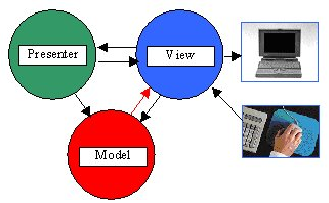
Entities
View is a composition of widgets. It responds to user actions and turns to the presenter to handle them. Its purpose is to display model data.
Presenter is in charge of presentation logic, it commands the model and changes presentation according to the application rules. It is tightly coupled with the view.
Model is a bunch of business objects that represent the problem domain. Mainly, these objects store data, interact with the DB and with external services and handle business logic. It's completely ignorant of the UI, thus it doesn't know anything about neither view nor presenter.
Collaboration
As mentioned above, Dolphin's MVP looks very much like Fowler's Supervising Controller.
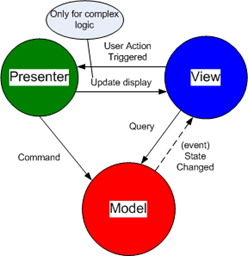
View delegates user inputs to the presenter -> presenter performs some UI related operation, changes internal UI related state, changes the view directly, and commands the model as appropriate -> model updates its state and raises the proper event -> view handles the event - it asks relevant data from the model and changes its display.
Taking a step backward toward 'Application Model MVC' and we have Fowler's Passive View
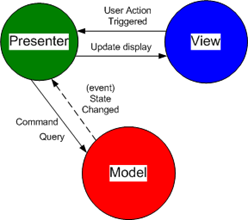
View delegates user inputs to the presenter -> presenter performs some UI related operation, changes internal UI related state, changes the view directly, and commands the model as appropriate -> model updates its state and raises the proper event -> presenter handles the event - it asks relevant data from the model and changes the view display.
Taking care of MVC problems
The Dolphin's faced the applicability problem by moving the controller responsibilities to the view and to the presenter. The view got the responsibility to respond to mouse and keyboard events (user inputs) and the presenter got the responsibility to command the model as appropriate.
Notice that in MVC there is controller for every widget, and every widget on the screen surface is called view. In MVP on the other hand, due to the elimination of the controller, there is no sentiment for a single widget and the screen itself is called view.
The Dolphin's faced the usability problem[1] by replacing the 'Application Model' with the presenter which is allowed to communicate directly with the view (through it abstraction) when necessary.
Notice that the view in Dolphin's MVP (also known as Supervising Controller) communicate with the model and register to its events, in 'Application Model MVC' on the other hand the view interact with model only through the 'Application Model'; Fowler's Passive View pattern describes MVP that looks more like 'Application Model MVC', as in Passive View the view interact with model only through the presenter.
Interaction
Let's review the 'Speaker Control' GUI from "MVC Design Pattern".

It has one simple use-case. [Trigger:] The user click on the 'Increase Volume' button [Main Success Scenario:] the speaker volume is increased by one and the text-box display is updated with the current volume [Rule:] If the volume exceed 12 than the color of the text-box text should be changed to red.
The diagram bellow shows how MVP (PassiveView) handles the use case.
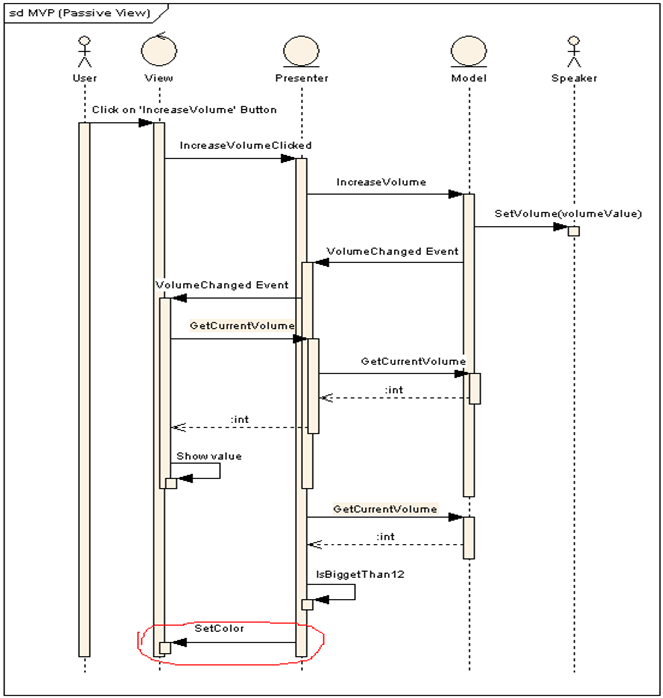
We saw in "MVC Design Pattern" that the 'Application Model' handled the rule logic (changing the color) since presentation logic is part of its concerns, we also saw that the fact that the 'Application Model' cannot change the text-box color directly lead to some awkward code i.e. 'Application Model' had to raise special event which the text-box had to handle.
In MVP, since the presenter is in charge of presentation logic - it is the one to handle the rule. Since presenter can change the text-box directly - unlike in 'Application Model MVC' - no awkward code is required.
Another thing to notice is that presenter respond to 'VolumeChange' event and delegate the event to the view instead of directly changing the text-box current volume. My reason for doing it 'the hard way' is to stress the point that not all UI updates had to be initiated directly by the presenter, presenter should access the view directly only for behaviors that don't fit into the Observer Synchronization (such as changing the color of a specific widget).
There are two MVC's out there - Classic MVC and Application Model MVC and there are two MVP's - Supervising Controller and Passive View.
Such being the case, we have 4 kinds of MVC vs. MVP combinations:
1) Classic MVC vs. PassiveView MVP
2) Classic MVC vs. SupervisingController MVP
3) ApplicationModel MVC vs. PassiveView MVP
4) ApplicationModel MVC vs. SupervisingController MVP
We've read the "MVC Design Pattern" post so we understand the differences between 'Classic MVC' and 'Application Model MVC', we've got so far so we understand the differences between 'PassiveView MVP' and 'SupervisingController MVP'. Hence, if we figure out the differences between ''ApplicationModel MVC' and 'PassiveView MVP' we will be able to understand all four MVC vs. MVP variations! (right?).
ApplicationModel MVC vs. PassiveView MVP
View
The view in AM-MVC is a widget (like in Classic MVC) on the screen, in P-MVP the view is the screen itself. i.e. MVP view is a composition of widgets wrapped up in a widget container that is known as the screen.
Presenter
The ApplicationModel in AM-MVC and the presenter in P-MVP are both responsible for presentation logic and they both act as intermediate class between the model and the view.
The big difference is that the presenter is tightly coupled to the view so it can modify the view directly, in contrast with the ApplicationModel that is loosely coupled (Observer Synchronization) with the view - so it can prompt the view to change only via events.
At first glimpse it seems like ApplicationModel was designed poorly. Because if it is in charge of presentation logic - how come it's loosely coupled with the view??
The reason is that ApplicationModel handles unknown number of view-controller pairs - so its default behavior is to act as an observer so it will not have to change when ever new widget is added to the screen. On the other hand, MVP presenter handles only one specific view - so it can be tightly coupled to it.
Even though ApplicationModel default behavior is to be loosed from its views - in real applications ApplicationModel often gain access to some of its views and break the observer pattern.
Model
The model is pretty much the same model, in P-MVP the presenter releases it from presentation concerns and in AM-MVC the ApplicationModel does that.
Still confused?
The main reason for the confusion is the overuse/misuse of the name 'controller'.
The thing that some people miss is that MVC controller it about processing user inputs and translating them into commands on the model - it is not about mediating between the model and the view. This mistake is the reason why the controller is often referred to as 'Application Model' and as presenter - and MVP is referred to as MVC.
It's important to understand that the main function of the controller is to intercept user input, other functions like commanding the model and changing its view are just byproduct of the main function; the presenter main function is to handle application logic, functions like interpreting events are just byproduct of the main function.
With the introduction of web style applications the need to process user inputs raised again. In this kind of applications user interactions are sent to the server as http-requests, since the controller is the processor of user inputs - its name is used in patterns such as 'Application Controller' which handles page flow concerns, "Page Controller" that handles a request for a specific page and 'Front Controller' that handles all requests for a Web site.
If you haven't had enough, Martin Hunter uses the controller in MPVC to split the presenter logic to view-related (presenter) and purpose-related (controller). Another one (me :p) uses the controller in other MPVC to extract view related concerns from the presenter.
In systems that have complex domain model, complex application model and many views that reflect the domain model data, it may make sense to pay the price of MVP (leaning the pattern, analyzing the design etc).
If we choose to MVP, we might want to ask ourselves if separating the presenter from the view is feasible.
I can point out few cases where for my opinion the answer is YES:
1) If the system supposed to support both windows (win-forms) and web (web-forms) views, then it's surely make sense to design one presenter that is able to interact with both web-view and windows-view.
2) If the system is supposed to be converted to another development environment (for instance from .Net 1/2.0 to WPF).
3) If the system has many views that require more than one presenter per view, than it’s only logical to create the same view with different presenter or to replace the view presenter on the fly.
4) If it is not enough to test only the domain model and we want to be able to test the application model as well.
In case the answer is NO, the presenter can be embedded in the view. Although it still depends on the developer’s point of view. For some developers the MVP design increases usability, readability and searchability. They prefer looking at clean methods like ‘PlayButtonClicked’ in the presenter over ‘m_BtnPlay_Clicked (object subject, EventArgs args)’ in the view. They’d rather register to model events in the presenter and leave the view to deal only with graphical matters.
[1] In MVC, most of the application functionality must be built into a model class known as an Application Model. It is the responsibility of the application model to be the mediator between the true domain objects and the views and their controllers. The views, of course, are responsible for displaying the domain data while the controllers handle the raw user gestures that will eventually perform actions on this data. So the application model typically has methods to perform menu command actions, push buttons actions and general validation on the data that it manages.
Nearly all of the application logic will reside in the application model classes. However, because the application model’s role is that of a go-between, it is at times necessary for it to gain access to the user interface directly but, because of the Observer relationship between it and the view/controller, this sort of access is discouraged.
Interesting links
Martin fowler - GUI Architectures
Ctrl-Shift-B: Interactive Application Architecture Patterns
Oliver Steel - Web MVC


